
Found a Game-Changer! Effortlessly Master WeChat Official Account Formatting
As someone who frequently writes for public accounts, I deeply understand the pain of formatting.
The WeChat Official Account editor has limited features, making it torture to create visually appealing layouts.
Until I discovered this treasure tool—doocs/md—which completely transformed my formatting experience!
What is doocs/md?
Simply put, doocs/md is a Markdown editor specifically designed for WeChat Official Accounts.
If you don't know what Markdown is, don't worry. It's a very simple text format that uses a few symbols to style your text.
For example:
- Use
#for headings - Surround text with
**for bold - Use
-for lists
By learning these basic syntax rules, you can create layouts that look better than most people's!
https://appstore.lazycat.cloud/#/shop/detail/cloud.lazycat.app.md
Why use this tool?
1. Completely solves formatting challenges
When I used to write WeChat articles, I was always fiddling with the WeChat editor:
- Had to manually set heading sizes and colors
- Want a code block? Sorry, the WeChat editor doesn't support it
- Want to insert mathematical formulas? Don't even think about it
- Spent huge amounts of time adjusting formatting each time
Now with doocs/md, I just focus on writing content, use simple Markdown syntax to mark up the format, and the tool automatically generates beautiful layouts for me. After writing, I simply copy and paste into the WeChat editor—perfect!
2. Clean and professional styling
This tool's design philosophy is "simple and elegant." Unlike other editors that can be overly flashy, doocs/md produces article styles that are very clean, professional, and have a quality feel.
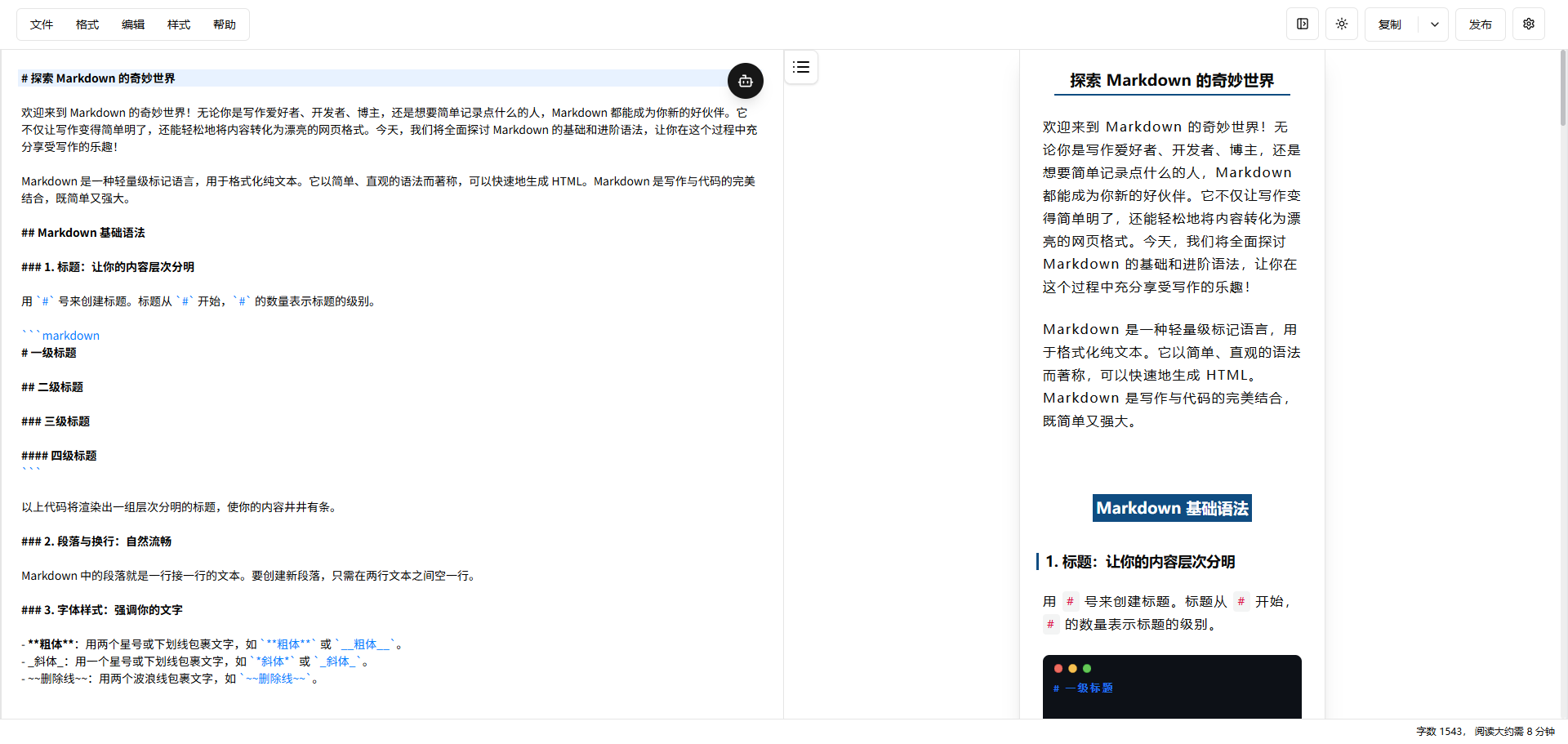
And the best part is, you can customize the theme color and CSS styles. If you have your own brand colors, you can easily adjust them to match your style.
3. Feature-rich but not complicated
Despite its simple interface, it has all the essential features:
Basic features:
- Supports all Markdown syntax
- Mathematical formula rendering
- Code highlighting (programmers' favorite)
- Chart support (Mermaid diagrams)
Advanced features:
- Multiple image hosting options (no more worrying about lost images)
- Document import/export
- Automatic draft saving
- AI assistant (helps optimize content)
The image hosting feature is so practical!
Speaking of image hosting, this feature is really thoughtful. Previously, the biggest headache when writing WeChat articles was dealing with images:
- Uploading directly to WeChat resulted in unstable image links
- Using other image hosting services was cumbersome
doocs/md supports numerous image hosting options:
- GitHub (free, suitable for developers)
- Alibaba Cloud OSS, Tencent Cloud COS (stable and reliable)
- Qiniu Cloud, Upyun (professional image hosting services)
- Even supports using WeChat Official Accounts directly as image hosting
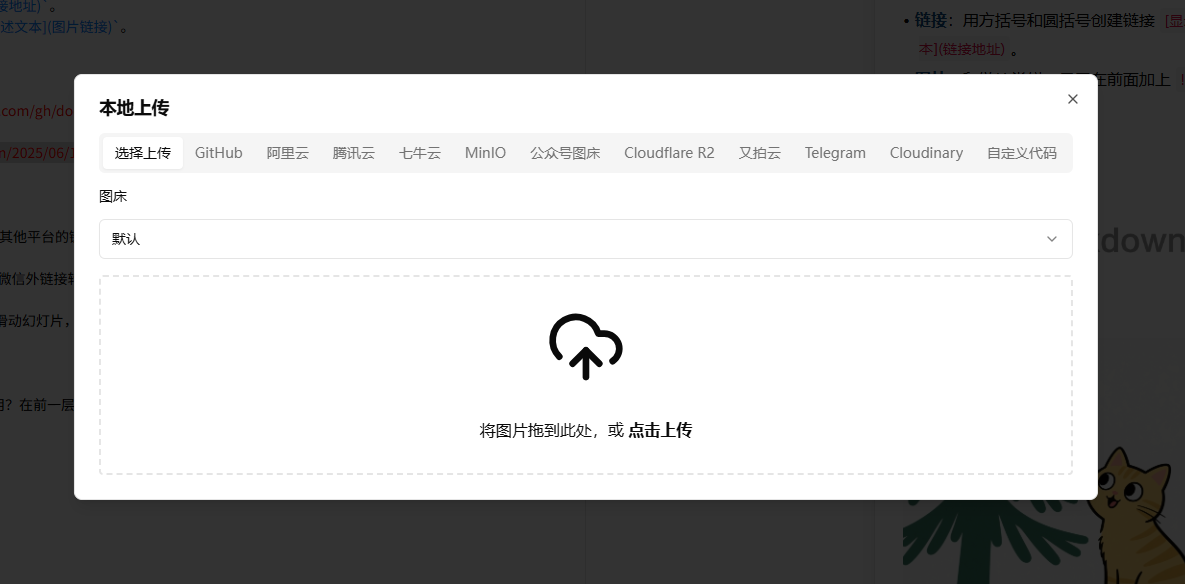 You just need to configure it once, and from then on uploading images is as simple as drag-and-drop. Images automatically upload to your chosen image hosting service, generating stable links—no more worrying about broken images.
AI assistant makes writing easier
Recently, the tool also integrated AI features, supporting:
- Mainstream models like DeepSeek, OpenAI, Tongyi Qianwen
- Helps optimize article content
- Generates title suggestions
- Modifies writing style
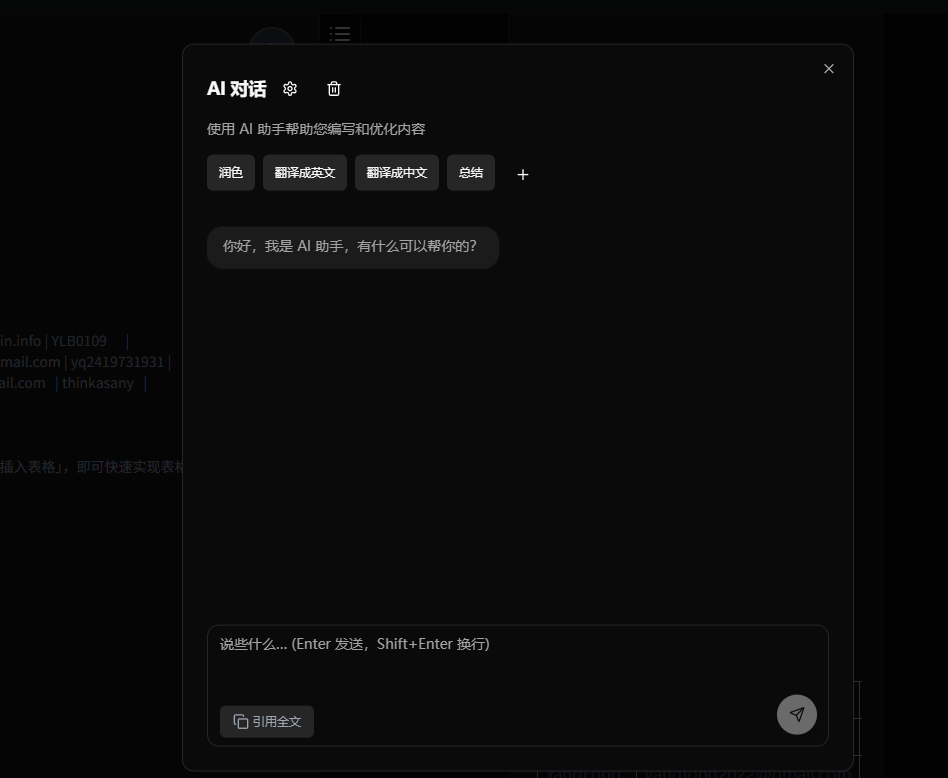 It's like having a personal writing assistant, especially helpful for those who have content but struggle with expressing it effectively.
How simple is it to use?
Online use (recommended for beginners)
Install directly on Lazycat. Open and start writing—it's that simple.
My real usage experience
After using this tool for several months, my WeChat article formatting efficiency has improved by at least 5 times:
Previous workflow:
- Write content in Word or another editor (30 minutes)
- Copy to WeChat editor (5 minutes)
- Adjust formatting, add styles (40 minutes)
- Insert images, adjust positioning (20 minutes)
- Repeatedly preview and adjust (15 minutes)
Total: 1 hour 50 minutes, and the process was painful.
Current workflow:
- Write content and format in doocs/md (35 minutes)
- Copy and paste into WeChat editor (2 minutes)
- Quick check (3 minutes)
Total: 40 minutes, and the writing process is enjoyable.
Most importantly, I can now focus on creating content without being distracted by formatting issues.
Who is this suitable for?
Particularly suitable for:
- WeChat Official Account operators: This tool was specifically designed for you
- Technical bloggers: Those who need code highlighting and mathematical formulas
- Knowledge sharers: Those who need clear formatting to express ideas
- Efficiency enthusiasts: Those who don't want to waste time on formatting
- Perfectionists: Those who want professional formatting results
Might be less suitable for:
- Completely non-technical users: Need to learn basic Markdown syntax
- Users who prefer super flashy formatting: This tool emphasizes simplicity, not suitable for magazine-style layouts
Is there a steep learning curve?
Many people hear "Markdown" and think it's technical, but it's really simple. You just need to learn these few symbols:
# Heading 1
## Heading 2
**Bold text**
*Italic text*
- List item
> Blockquote
That's it—you can learn it in 10 minutes. And the tool itself is intuitive, with Markdown on the left and real-time preview on the right, making it effortless to learn.
Summary
If you frequently write WeChat articles or need to format content in any form, I strongly recommend trying doocs/md:
Advantages:
- Extremely efficient formatting, professional and beautiful
- Feature-rich but simple to operate
- Supports multiple image hosting options and AI assistant
- Completely free, open-source and reliable
Minor drawbacks:
- Need to learn basic Markdown syntax (but it's really simple)
- Styles are relatively simple, not suitable for very flashy designs
For me, this tool has completely changed my content creation experience. Now I can spend more time on the content itself rather than wasting it on formatting adjustments.
If you've also struggled with formatting issues, I really suggest you give it a try. Once you learn the basics, you'll find this tool is a godsend for content creators!
Quick start:
- GitHub address: https://github.com/doocs/md
Go try it out—I believe you'll love this tool as much as I do!